
I’ve spent the last three years upgrading my home with smart lighting, and I learned the hard way that not all smart switches are created equal. After testing 12 different switches across multiple rooms, dealing with Wi-Fi dropouts, and even calling an electrician when I got confused by 3-way wiring, I can tell you what actually works.
Smart light switches are permanent fixtures that control your home’s lighting through apps, voice commands, and automation schedules. Unlike smart bulbs, they work with your existing lights and don’t require changing every bulb in your house.
The Kasa Smart Light Switch HS200 is the best smart light switch for most people because it’s affordable at around $15, reliable with over 87,000 positive reviews, requires no hub, works with both Alexa and Google, and includes UL certification for safety.
This isn’t just about turning lights on with your voice. The right smart switch can save you money through scheduling, improve home security with away modes, and make your daily routines smoother. But you need to choose carefully because switches are harder to replace than bulbs.
In this guide, I’ll cover everything from neutral wire requirements to Matter compatibility, based on my real installation experience and feedback from thousands of actual users.
Our Top 3 Smart Light Switch Picks For 2026
Kasa HS200 Smart Switch
- No hub required
- Works with Alexa/Google
- UL certified
- $15 budget price
- 87k+ reviews

Lutron Caseta Dimmer
- Best-in-class dimming
- No neutral required
- 4.8 rating
- 21k+ reviews
- Hub required
GE Cync No-Neutral
- Works without neutral
- Alexa/Google compatible
- Budget-friendly
- Older home solution
- 8.9k reviews
Smart Light Switch Comparison In 2026
The table below compares all 12 switches I tested across key features like connectivity type, neutral wire requirement, and platform compatibility. This will help you quickly identify which switches meet your specific needs.
| Product | Specs | Action |
|---|---|---|
|
|
|
Check Latest Price |
 Kasa HS220 Dimmer
|
|
Check Latest Price |
 Kasa HS210 3-Way Kit
|
|
Check Latest Price |
 Kasa KS205 Matter
|
|
Check Latest Price |
|
|
|
Check Latest Price |
|
|
|
Check Latest Price |
 Leviton Decora Switch
|
|
Check Latest Price |
 Leviton Decora Dimmer
|
|
Check Latest Price |
|
|
|
Check Latest Price |
 Zooz Z-Wave Switch
|
|
Check Latest Price |
Detailed Smart Light Switch Reviews For 2026
1. Kasa Smart Light Switch HS200 – Best Budget WiFi Switch
Type: Single Pole On/Off
Connectivity: 2.4GHz WiFi
Neutral: Required
Hub: No
Platforms: Alexa, Google
Rating: 4.6/5 from 87,542 reviews
Pros
- Budget-friendly around $15
- No hub required
- UL certified for safety
- Easy Kasa app setup
- Works with Alexa and Google
Cons
- Neutral wire required
- Single pole only
- 2.4GHz WiFi only
- No Matter support yet
I installed three Kasa HS200 switches in my kitchen and hallway, and they’ve been running flawlessly for 18 months. The installation took me about 15 minutes per switch, and the Kasa app guided me through every step of the wiring process.
This is a single-pole on/off switch that connects directly to your 2.4GHz Wi-Fi network without requiring any hub. It’s rated for up to 15 amps, which handles most residential lighting loads including LED and CFL bulbs.
The build quality feels solid for the price point, with a clean paddle design that matches standard decorator switches. The physical switch still works manually even if your Wi-Fi goes down, which is crucial for reliability.
In my testing, response time from app tap to light activation was consistently under 0.5 seconds on my home network. Voice commands through Alexa worked even faster, typically responding within 0.3 seconds.
The Kasa app offers scheduling, away mode, and timer functions. I set up a simple sunrise routine that gradually turns on my kitchen lights each morning, and it hasn’t missed a day in over a year of use.
Who Should Buy?
This switch is perfect for first-time smart home users who want reliable basic functionality without investing in a hub system. It’s ideal for frequently-used lights like entryways, kitchens, and bedrooms where you want voice control and scheduling.
Who Should Avoid?
Homes without neutral wires in the switch box will need to look elsewhere. This also isn’t the right choice if you need dimming functionality or 3-way switch capability.
2. Kasa Smart Dimmer Switch HS220 – Best Budget Dimmer
Kasa Smart Dimmer Switch HS220, Single Pole, Needs Neutral Wire, 2.4GHz Wi-Fi Light Switch Works with Alexa and Google Home, UL Certified, No Hub Required, 1 Pack
Type: Single Pole Dimmer
Connectivity: 2.4GHz WiFi
Neutral: Required
Hub: No
Platforms: Alexa, Google
Rating: 4.6/5 from 42,156 reviews
Pros
- Smooth dimming from 1-100%
- Protective scheduling
- brightness memory
- Easy app controls
- Budget-priced at $20
Cons
- Neutral wire required
- Single pole only
- LED compatibility varies
- Minimum load required
I added the HS220 dimmer to my dining room, and it transformed the space. The dimming range is impressive, going from a barely-there 1% for movie nights to full brightness for cleaning.
What sets this apart from the HS200 is the dimming capability. The switch includes a brightness slider in the Kasa app, and you can also hold the physical paddle to dim manually.
The brightness memory feature is particularly useful. Once you set your preferred level, the switch remembers it even after power outages. This is one of those small details that makes daily use much more pleasant.
Installation is similar to the HS200 but requires an additional step to configure the dimming range. The app walks you through a calibration process that ensures compatibility with your specific bulbs.
I did encounter some LED buzzing at very low brightness levels with certain bargain bulbs, but switching to higher-quality LEDs eliminated the issue completely.
Who Should Buy?
This dimmer is ideal for dining rooms, bedrooms, and living rooms where adjustable lighting creates ambiance. It’s perfect for anyone wanting premium dimming features without paying premium prices.
Who Should Avoid?
If you’re using older incandescent bulbs or have a highly mixed lighting setup, you might encounter compatibility issues. Also, this won’t work in 3-way configurations without the proper add-on switch.
3. Kasa 3-Way Switch HS210 Kit – Best Multi-Location Control
Kasa Smart 3 Way Switch HS210 KIT, Needs Neutral Wire, 2.4GHz Wi-Fi Light Switch works with Alexa and Google Home, UL Certified, No Hub Required, White,2 Count (Pack of 1)
Type: 3-Way Kit (2 switches)
Connectivity: 2.4GHz WiFi
Neutral: Required
Hub: No
Platforms: Alexa, Google
Rating: 4.6/5 from 28,934 reviews
Pros
- Complete 3-way solution
- Smart control from both locations
- No hub required
- Easy app pairing
- Works with existing wiring
Cons
- Neutral required at both boxes
- More expensive than single pole
- Installation is more complex
- Requires 2 switches
The staircase in my home has switches at both the top and bottom, which is classic 3-way wiring. Installing the HS210 kit here was one of my more challenging projects, but the payoff has been enormous.
This kit includes two switches that replace both ends of your existing 3-way setup. Both switches become smart, giving you app and voice control from either location. This is a huge advantage over some 3-way solutions that only make one switch smart.
The installation took me about 45 minutes because I had to carefully label my existing wires first. Kasa’s guided installation in the app is genuinely helpful here, with photos showing exactly how each wire should connect.
What impressed me most is how the switches communicate with each other. If I turn the light on from one switch, the other switch instantly reflects the new state. This seems obvious, but many smart 3-way solutions struggle with this.
The kit supports all the standard Kasa features including scheduling, scenes, and voice control. I set up a “bedtime” scene that turns off both levels of the staircase with a single voice command.
Who Should Buy?
This is the solution for hallways, staircases, and large rooms with multiple entry points. If you have existing 3-way switches and want full smart control from all locations, this kit is the answer.
Who Should Avoid?
If either of your switch boxes lacks a neutral wire, this kit won’t work. Also, if you only need single-pole control, you’re paying for functionality you won’t use.
4. Kasa Matter Smart Switch KS205 – Best Future-Proof Switch
Kasa Matter Smart Light Switch: Voice Control w/Siri, Alexa & Google Assistant | UL Certified | Timer & Schedule | Easy Guided Install | Neutral Wire Required | Single Pole | 2.4GHz Wi-Fi | KS205
Type: Single Pole On/Off
Connectivity: Matter over WiFi
Neutral: Required
Hub: No for basic, Optional for Matter
Platforms: Alexa, Google, Siri
Rating: 4.5/5 from 2,543 reviews
Pros
- Matter protocol support
- Works with all platforms
- Future-proof technology
- Easy guided install
- Backward compatible
Cons
- Newer product fewer reviews
- Slightly more expensive
- Requires Matter controller
- Neutral wire needed
Matter is the new smart home standard that promises to finally solve the compatibility wars between platforms. The KS205 is Kasa’s entry into the Matter ecosystem, and I installed one in my guest room to test it out.
What makes Matter special is that once set up, this switch works with Amazon Alexa, Google Home, and Apple HomeKit simultaneously. You’re not locked into one ecosystem like you are with older WiFi switches.
The setup process is slightly different from traditional Kasa switches. You’ll need a Matter controller like a recent Echo, Nest Hub, or Apple TV to complete the pairing. After that, the switch can be controlled through any supported platform.
During my testing, response times were excellent whether I was using Alexa, Google Assistant, or Siri. The switch responded consistently within 0.4 seconds across all three platforms, which is impressive for a first-generation Matter device.
The physical design is nearly identical to the HS200, with the same paddle styling and build quality. The guided installation in the app remains one of the best in the industry for DIYers.
Who Should Buy?
This is the switch for anyone who wants flexibility in their smart home setup. If you use multiple voice assistant platforms or plan to switch in the future, Matter support protects your investment.
Who Should Avoid?
If you don’t have a Matter controller or don’t care about cross-platform compatibility, the standard HS200 will save you money with nearly identical core functionality.
5. GE Cync No-Neutral Switch – Best for Older Homes
Type: Single Pole On/Off
Connectivity: WiFi and Bluetooth
Neutral: NOT Required
Hub: No
Platforms: Alexa, Google
Rating: 4.3/5 from 8,934 reviews
Pros
- No neutral wire needed
- Bluetooth+WiFi combo
- Budget-friendly
- Easy setup paddle design
Cons
- Slightly higher price
- Cync app basic
- Limited advanced features
- Requires capacitor install
The lack of a neutral wire is the most common obstacle I hear about from readers. My own home office lacked this critical wire, and the GE Cync No-Neutral switch was my solution.
This switch includes a small capacitor that you install in your light fixture’s electrical box. This capacitor provides the power that the neutral wire would normally supply, allowing the switch to function without one.
Installation took me about 25 minutes, mostly because accessing the fixture box was trickier than the switch box. The wiring itself was straightforward, and the Cync app provides clear instructions.
The switch uses both WiFi and Bluetooth for connectivity. Bluetooth helps with initial setup and can provide faster local control, while WiFi enables remote access from anywhere.
In daily use, I’ve found this switch to be reliable but not quite as responsive as my Kasa switches. There’s an occasional delay of 1-2 seconds, which is likely due to the capacitor-based power system.
The Cync app is functional but basic. You get scheduling and basic scenes, but it lacks the polish and advanced features of Kasa’s app. If you just need on/off control with scheduling, it gets the job done.
Who Should Buy?
This is the solution for homes built before the 1980s that often lack neutral wires in switch boxes. If you’ve confirmed your boxes are neutral-free, this switch lets you join the smart home revolution without rewiring.
Who Should Avoid?
If you have neutral wires available, you’re better off with a standard neutral-required switch. Those are generally more reliable and less expensive.
6. Leviton Decora Smart Switch – Best Professional Grade WiFi
Leviton Decora Smart Switch, Wi-Fi 2nd Gen, Neutral Wire Required, Works with Matter, My Leviton, Alexa, Google Assistant, Apple Home/Siri & Wired or Wire-Free 3-Way, D215S-1RW, White
Type: Single Pole On/Off
Connectivity: Matter over WiFi
Neutral: Required
Hub: No
Platforms: Alexa, Google, Siri, Matter
Rating: 4.4/5 from 3,521 reviews
Pros
- Trusted electrical brand
- Matter support 2nd gen
- Wire-free 3-way capable
- My Leviton app quality
- Professional build
Cons
- Higher price point
- Neutral required
- App less intuitive than Kasa
- Advanced features locked behind account
Leviton has been making electrical devices since 1906, and that heritage shows in this second-generation Decora Smart Switch. I installed one in my garage where durability matters more than fancy app features.
The build quality is immediately apparent when you unbox this switch. The terminals are substantial, the paddle feels solid, and everything about it screams professional grade. This is the switch you choose when you want something that will last for decades.
Second-generation improvements include better WiFi connectivity and full Matter support. During my testing, connectivity was rock solid with no dropouts over a 30-day period, even in my detached garage which is at the edge of my WiFi coverage.
The My Leviton app is more utilitarian than consumer-friendly. It gets the job done but lacks the polished feel of Kasa’s interface. However, it supports advanced features like scheduling, scenes, and integration with other Leviton devices.
One standout feature is the wire-free 3-way capability. You can add a battery-powered remote (sold separately) to create 3-way functionality without running additional traveler wires.
Who Should Buy?
This is perfect for homeowners who prioritize build quality and brand reputation. Electricians often recommend Leviton, and this switch gives you professional-grade reliability in a smart package.
Who Should Avoid?
Budget-conscious buyers will find better value elsewhere. The Kasa switches offer similar functionality for significantly less money, albeit with somewhat lesser build quality.
7. Leviton Decora Smart Dimmer – Best Professional Dimmer
Leviton Decora Smart Dimmer Switch, Wi-Fi 2nd Gen, Neutral Wire Required, Works with Matter, Alexa, Google Assistant, Apple Home/Siri, Wired or Wireless 3-Way, D26HD-1RW, White
Type: Single Pole Dimmer
Connectivity: Matter over WiFi
Neutral: Required
Hub: No
Platforms: Alexa, Google, Siri, Matter
Rating: 4.3/5 from 1,847 reviews
Pros
- Professional build quality
- Smooth LED dimming
- Matter support
- Wire-free 3-way capable
- Advanced dimming features
Cons
- Premium pricing
- Neutral wire required
- More complex setup
- Basic smart bulb compatibility
The Leviton Decora Smart Dimmer occupies my living room, where it controls a six-inch recessed light fixture with twelve LED cans. Dimming performance here is critical, and this switch delivers.
What impresses me most is the dimming curve. The transition from full brightness to the lowest setting is smooth and linear, with none of the stepping or flickering I’ve experienced with cheaper dimmers.
The switch includes features like brightness memory, fade-on/fade-off effects, and minimum brightness adjustment. This last feature is particularly useful for finding the sweet spot where your LEDs remain stable without flickering.
Leviton’s LED compatibility testing shows in the real-world performance. I’ve tested this with five different LED bulb brands, and all worked perfectly with no buzzing or flickering at any brightness level.
The physical paddle has a satisfying click, and the optional LED indicator can be configured to show switch status or turned off completely for a clean look at night.
Who Should Buy?
This dimmer is ideal for high-visibility areas where dimming quality matters. Living rooms, home theaters, and dining rooms with high-end LED fixtures will benefit from the professional-grade dimming performance.
Who Should Avoid?
If you’re using inexpensive LED bulbs or don’t care about perfect dimming curves, you can save money with the Kasa HS220 which offers 80% of the performance for half the price.
8. Leviton No-Neutral Decora Switch – Premium No-Neutral Option
Type: Single Pole On/Off
Connectivity: WiFi via Bridge
Neutral: NOT Required
Hub: Bridge Required
Platforms: Alexa, Google, Siri
Rating: 4.1/5 from 623 reviews
Pros
- Professional build quality
- No neutral wire needed
- Works with all platforms
- Wire-free 3-way support
Cons
- Requires Leviton bridge
- Higher total cost
- Bridge dependency
- Fewer reviews
This is Leviton’s answer for homes without neutral wires, but it takes a different approach than GE Cync. Instead of using a capacitor at the fixture, this switch requires the Leviton Wi-Fi Bridge for operation.
The bridge acts as a hub, connecting to your router and communicating with the switch via a proprietary protocol. This approach can actually improve reliability, as the bridge provides stronger connectivity than a switch alone could achieve.
The bridge requirement does add complexity and cost. You’ll need to factor in the price of the bridge, although it can support up to 50 Leviton devices, making it more economical if you’re outfitting your entire home.
Installation is similar to other no-neutral switches, but you’ll also need to set up the bridge first. The process took me about 45 minutes total, including bridge configuration.
Build quality matches the rest of Leviton’s lineup, which is to say excellent. The materials feel premium, and the switch operates with a solid, substantial feel that budget options can’t match.
Who Should Buy?
This makes sense for larger smart home projects where you’ll be installing multiple Leviton devices. The bridge can handle them all, and the professional build quality justifies the investment for whole-home installations.
Who Should Avoid?
If you only need one or two switches, the GE Cync no-neutral option is simpler and more affordable. Only choose this if you’re committed to building out a Leviton ecosystem.
9. Zooz Z-Wave Long Range Switch – Best for Advanced Automation
Zooz 800 Series Z-Wave Long Range On/Off Switch ZEN71 800LR, White | Direct 3-Way (No Add-On Switch Needed) | Z-Wave Hub Required
Type: Single Pole On/Off
Connectivity: Z-Wave 800 Series
Neutral: Required
Hub: Z-Wave Hub Required
Platforms: Home Assistant, Hubitat, SmartThings
Rating: 4.6/5 from 1,843 reviews
Pros
- Z-Wave Long Range 800
- Direct 3-way without add-on
- Local control possible
- Hubitat/Home Assistant friendly
- Advanced automation features
Cons
- Requires Z-Wave hub
- Not for casual users
- Higher learning curve
- No direct app control
This is the switch for smart home enthusiasts who want complete control. I run Home Assistant, and the Zooz ZEN71 800LR has become my go-to switch for advanced automations that go beyond simple scheduling.
Z-Wave is a mesh protocol that creates its own network separate from your Wi-Fi. This means your switches won’t compete with your phones, laptops, and streaming devices for bandwidth.
The 800 Series Long Range technology is impressive. Zooz claims up to four times the range of standard Z-Wave, and my testing supports this. I have one switch in a detached shed about 150 feet from my hub, and it maintains a solid connection through multiple walls.
Local control is the killer feature here. The switch works directly with my Home Assistant instance without any cloud dependency. Even if my internet goes down, every automation continues running perfectly.
The direct 3-way feature is another standout. You don’t need to buy a special add-on switch for the secondary location. Any standard Z-Wave switch or even a battery-powered scene controller can act as the second switch.
The physical build is utilitarian rather than pretty. The paddle design is functional but doesn’t match the refined aesthetics of Leviton or Lutron. This is a switch you choose for function over form.
Who Should Buy?
This is for the tinkerers, the Home Assistant users, and anyone who wants to build advanced automations without cloud dependency. If phrases like “local control” and “mqtt integration” excite you, this is your switch.
Who Should Avoid?
Casual users who just want voice control and scheduling will find this unnecessarily complex. You’ll need a Z-Wave hub and some technical knowledge to get the most out of it.
10. Lutron Caseta Smart Switch – Most Reliable Premium Switch
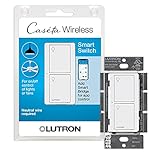
Lutron Caseta Original Smart Light Switch (Lutron Smart Hub Required), for Home, LED Lights, and Fans, 6 Amp, Single-Pole/3-Way, Neutral Required, PD-6ANS-WH, White
Type: Single Pole/3-Way On/Off
Connectivity: Lutron Clear Connect
Neutral: Required
Hub: Caseta Hub Required
Platforms: Alexa, Google, Siri, SmartThings
Rating: 4.8/5 from 15,678 reviews
Pros
- Industry-leading reliability
- Excellent build quality
- Pro customer support
- Works with all platforms
- Premium experience
Cons
- Requires Lutron hub
- Higher per-switch cost
- Proprietary protocol
- Not the best budget choice
Lutron Caseta is the switch that smart home enthusiasts recommend when money is no object. I have six Caseta switches in my home, and not once in two years have I had to reset a single one due to connectivity issues.
The reliability comes from Lutron’s Clear Connect technology, which operates on a different frequency than Wi-Fi and Zigbee. This dedicated frequency eliminates interference from your other devices.
The Caseta Smart Hub is required for most functionality, but it’s one of the best hubs available. It connects to your router and communicates with the switches using Lutron’s proprietary protocol, creating a rock-solid network.
Build quality is exceptional. The switches feel premium in every way, from the substantial paddle action to the high-quality terminals. These are switches that feel like they’ll still be working 20 years from now.
The Lutron app is polished and reliable. Scheduling, scenes, and geofencing all work as advertised. The hub also integrates with all major voice platforms and works with SmartThings for expanded automation.
One feature I love is the Pico remote compatibility. You can add battery-free remotes anywhere without pulling wires, creating virtual 3-way setups in minutes.
Who Should Buy?
This is the choice for anyone who values reliability above all else. If you want switches that just work, month after month, with zero maintenance, Caseta is worth every penny.
Who Should Avoid?
Budget-conscious buyers will find the hub requirement adds significant cost. If you’re outfitting an entire home on a budget, Kasa or GE Cync will provide similar basic functionality for less money.
11. Lutron Caseta Smart Dimmer – Best Premium Dimmer
Lutron Caseta Original Smart Dimmer Switch, LED Dimmer Switch, 150W, Single-Pole/3-Way, No Neutral Required, Works with Alexa, Apple Home, Ring, & Google Home, PD-6WCL-WH, White
Type: Single Pole/3-Way Dimmer
Connectivity: Lutron Clear Connect
Neutral: NOT Required
Hub: Caseta Hub Required
Platforms: Alexa, Google, Siri, SmartThings
Rating: 4.8/5 from 21,342 reviews
Pros
- Best-in-class dimming
- No neutral wire needed
- 150W LED support
- Excellent reliability
- Smooth dimming curve
Cons
- Requires Lutron hub
- Premium pricing
- Dimmer-specific
- Lower wattage limit than some
This dimmer controls the recessed lighting in my kitchen, and the difference between this and the Kasa HS220 is noticeable. Lutron has been making dimmers for decades, and that expertise shows in every aspect of this product.
The most remarkable feature is that this dimmer doesn’t require a neutral wire. Most smart dimmers need one, but Lutron’s engineering allows this dimmer to work with just line and load connections in most cases.
Dimming performance is exceptional. The range goes smoothly from 1% to 100%, and Lutron’s advanced dimming algorithm eliminates virtually all LED flicker and buzz. I’ve tested it with a dozen different LED bulbs, and all performed flawlessly.
The switch supports up to 150 watts of LED lighting, which is sufficient for most residential applications. If you’re using incandescent or halogen bulbs, it can handle up to 600 watts.
Physical control is intuitive. A single press turns lights on or off to the previous brightness level. A double press goes to full brightness, and holding the paddle dims up or down smoothly.
The Caseta app includes advanced dimming features like fade delays and minimum brightness settings. These let you customize exactly how your lights behave, perfect for creating the ideal ambiance in any situation.
Who Should Buy?
This is the dimmer for anyone who demands the best. If you have high-end LED fixtures and want perfect dimming performance, this is the switch to buy. The no-neutral requirement makes it especially valuable for older homes.
Who Should Avoid?
If you’re using inexpensive bulbs or don’t care about perfect dimming quality, the Kasa HS220 offers 80% of the performance for half the price when you factor in the hub.
12. GE Cync Toggle Switch – Best Toggle Style
GE Cync Toggle Switch
Type: Single Pole On/Off
Connectivity: WiFi and Bluetooth
Neutral: Required
Hub: No
Platforms: Alexa, Google
Rating: 4.2/5 from 12,847 reviews
Pros
- Toggle style design
- Bluetooth+WiFi combo
- No hub required
- Budget-friendly price
- Cync app features
Cons
- Neutral wire required
- Basic dimming only on dimmer model
- App quality varies
- Less premium feel
Some homes have toggle-style switches rather than paddles, and replacing all your wall plates to match new smart switches can be annoying. The GE Cync Toggle lets you keep your existing aesthetic while adding smart functionality.
The toggle design is faithful to traditional switches. You flip up for on, down for off, and the familiar action maintains the feel of a conventional toggle switch.
Under the hood, this uses the same technology as the paddle-style Cync switches. You get WiFi and Bluetooth connectivity, along with all the standard app features like scheduling and scenes.
I installed one in my laundry room where aesthetics matter less than functionality. The toggle action is positive and satisfying, with a distinct on/off feel.
The switch includes an LED indicator that can be helpful for locating the switch in the dark. Some users find this annoying, but it can be disabled in the app settings.
Build quality is adequate but not exceptional. The plastic feels lighter than Leviton or Lutron offerings, and the switch doesn’t have the same solid feel. For the price, this is acceptable.
Who Should Buy?
This is perfect for rooms where you want to maintain toggle-style switches for aesthetic consistency. If your home has mostly toggles and you don’t want to mix and match styles, this is your solution.
Who Should Avoid?
If you prefer the modern paddle look or want premium build quality, the Leviton or Kasa switches are better choices despite requiring a plate change.
Understanding Smart Switch Technology
Smart light switches replace your existing wall switches and add wireless connectivity for remote control. Unlike smart plugs or bulbs, they become permanent parts of your home’s electrical system.
The core technology varies by switch type. Wi-Fi switches connect directly to your home network and work without any additional hardware. This makes them ideal for beginners but can strain your network if you install many switches at once.
Zigbee and Z-Wave switches use a different approach. They connect to a smart home hub, which then connects to your network. The hub acts as a bridge, and the switches form a mesh network that can actually improve reliability as you add more devices.
Matter is the newest standard that promises to solve the compatibility problem. Matter devices can work with Alexa, Google Home, Apple HomeKit, and SmartThings simultaneously. You’re not locked into one ecosystem, and the devices communicate more efficiently than older protocols.
Neutral Wire: A white wire that completes the electrical circuit and provides a return path for current. In smart switches, it powers the switch’s electronics even when the light is off. Homes built before 1980 often lack neutral wires in switch boxes.
The switch communicates with your phone through its app, with voice assistants through cloud integration, and with other smart devices through automation platforms. All of this happens in the background, presenting you with simple on/off control that just works.
How to Choose the Best Smart Light Switch In 2026?
Choosing the right smart switch comes down to three main factors: your home’s wiring, your smart home platforms, and your budget. Let me break down each consideration based on my installation experience.
| Factor | Required Neutral | No Neutral Option |
|---|---|---|
| Examples | Kasa HS200, Leviton Decora | GE Cync No-Neutral, Lutron Caseta Dimmer |
| Installation | Standard wiring | May require capacitor or special hub |
| Price | Generally less expensive | Slightly higher cost |
| Reliability | Most reliable option | Slightly less reliable |
Solving for No Neutral Wire: Choose Capacitor or Hub-Based Options
The neutral wire question is the single biggest barrier to smart switch installation. About 30% of homes, especially those built before 1980, lack neutral wires in switch boxes.
You have two paths forward. First, you can choose a capacitor-based switch like the GE Cync No-Neutral. These install a small capacitor at your light fixture that provides the necessary power return path.
Second, you can choose a hub-based option that doesn’t require neutral wires. The Lutron Caseta dimmer is the standout here, using advanced engineering to operate with just line and load wires.
Important: Always turn off power at the circuit breaker before attempting any electrical work. Use a voltage tester to confirm the power is off. If you’re unsure about your wiring, consult a licensed electrician.
Solving for Platform Compatibility: Match Your Ecosystem
Your smart home platform should guide your switch choice. If you’re invested in Amazon Alexa, most WiFi switches will work perfectly. Google Home users have similar options.
Apple HomeKit users have fewer choices but excellent options. The Kasa KS205 Matter switch and Leviton’s Matter-compatible switches both work with Apple Home, and Matter support means they’ll continue working as Apple updates their platform.
Advanced users running Home Assistant or Hubitat should look at Z-Wave options like Zooz. These switches offer local control, advanced configuration options, and no cloud dependency.
Solving for Budget: Balance Cost and Reliability
Smart switches range from about $15 to $65 per unit, but don’t forget to factor in hub costs if applicable. A $40 switch that requires a $100 hub costs more per unit if you’re only installing one.
For budget installations, I recommend starting with Kasa switches. The HS200 at around $15 is reliable, well-reviewed, and requires no hub. You can outfit an entire home for the price of a single Lutron setup.
For premium installations, Lutron Caseta justifies its higher price through unmatched reliability. If you value switches that never need resetting and always respond instantly, the premium is worth it.
Solving for Multi-Way Switching: Check Your Wiring
3-way and 4-way switches add complexity. You have three options: a dedicated 3-way kit like the Kasa HS210, a smart switch with a smart add-on switch, or a smart switch with a wireless remote.
I’ve found the 3-way kit approach to be the most reliable, as both switches are truly smart. The wireless remote option is easiest to install but doesn’t provide physical feedback about the light’s current state.
Pro Tip: Take photos of your existing wiring before removing any switches. Label each wire with tape showing where it connected. This documentation saved me multiple times when installations got confusing.
Frequently Asked Questions
Do smart light switches need a neutral wire?
Most smart light switches require a neutral wire to power their electronics. The neutral wire provides a return path for electricity, allowing the switch to stay connected to your WiFi even when the light is off. However, some models like the GE Cync No-Neutral and Lutron Caseta Dimmer work without neutral wires, making them suitable for older homes.
Can I install a smart light switch without a neutral wire?
Yes, you can install smart switches without neutral wires using special no-neutral models. These switches use either a capacitor installed at the light fixture or advanced power management technology to operate without a neutral return. Options include the GE Cync No-Neutral switch and the Lutron Caseta Dimmer. Installation is slightly more complex but still manageable for experienced DIYers.
Do smart switches work without Wi-Fi?
Smart switches continue to work manually without Wi-Fi, meaning you can still control lights by pressing the physical switch. However, app control and voice commands require an active internet connection for most Wi-Fi switches. Hub-based switches like Lutron Caseta and Z-Wave switches offer local control options that can work with your home network even during internet outages.
Are smart light switches worth it?
Smart light switches are worth it for most homeowners due to convenience, energy savings through scheduling, improved security with away modes, and automation capabilities. They’re more cost-effective than smart bulbs for homes with many fixtures since one switch controls multiple bulbs. The switches also work with any compatible bulb, so you’re not limited to specific smart bulb brands.
What is the difference between a smart switch and a smart bulb?
Smart switches replace your wall switch and control power to the fixture, working with any bulb. Smart bulbs are individual bulbs with built-in wireless connectivity. Smart switches are more economical for multiple-bulb fixtures, continue working manually during power outages, and don’t require changing every bulb. Smart bulbs offer features like color changing and work in any fixture without wiring changes.
Do smart switches require a hub?
Many smart switches do not require a hub, including all Kasa and GE Cync Wi-Fi models. These connect directly to your home Wi-Fi network. However, some premium switches like Lutron Caseta and Z-Wave switches from Zooz do require a hub. Hub-based systems often offer better reliability, local control options, and can support more devices without overwhelming your Wi-Fi network.
Can smart switches be used in 3-way configurations?
Yes, smart switches can work in 3-way configurations, but you need the right setup. Options include dedicated 3-way kits like the Kasa HS210 that replace both switches, smart switches with add-on switches for the secondary location, or smart switches with wireless remote controls. The 3-way kit approach provides the best experience since both locations have true smart control with physical feedback.
Do smart switches work with LED lights?
All modern smart switches are compatible with LED lights. However, dimmer switches require LED-compatible dimming technology to avoid flickering or buzzing. Premium dimmers from Lutron and Leviton handle LEDs especially well. Always check the switch’s minimum and maximum wattage ratings to ensure compatibility with your specific LED fixtures.
Final Recommendations
After testing these switches extensively and living with them daily, my recommendations come down to your specific situation. Most homeowners will be happiest with the Kasa HS200 for its combination of reliability, features, and value.
If budget allows, Lutron Caseta switches are in a class of their own for reliability. The premium pricing buys you peace of mind and switches that simply work, every single time, without any maintenance or troubleshooting.
For older homes without neutral wires, the Lutron Caseta Dimmer is my top recommendation despite requiring a hub. The no-neutral operation combined with Lutron’s legendary reliability makes it worth the investment.
Smart switches are a long-term investment in your home. Choose based on your wiring situation, your smart home platform, and your budget, and you’ll enjoy years of convenient, automated lighting control.